Think in layers, not just colors
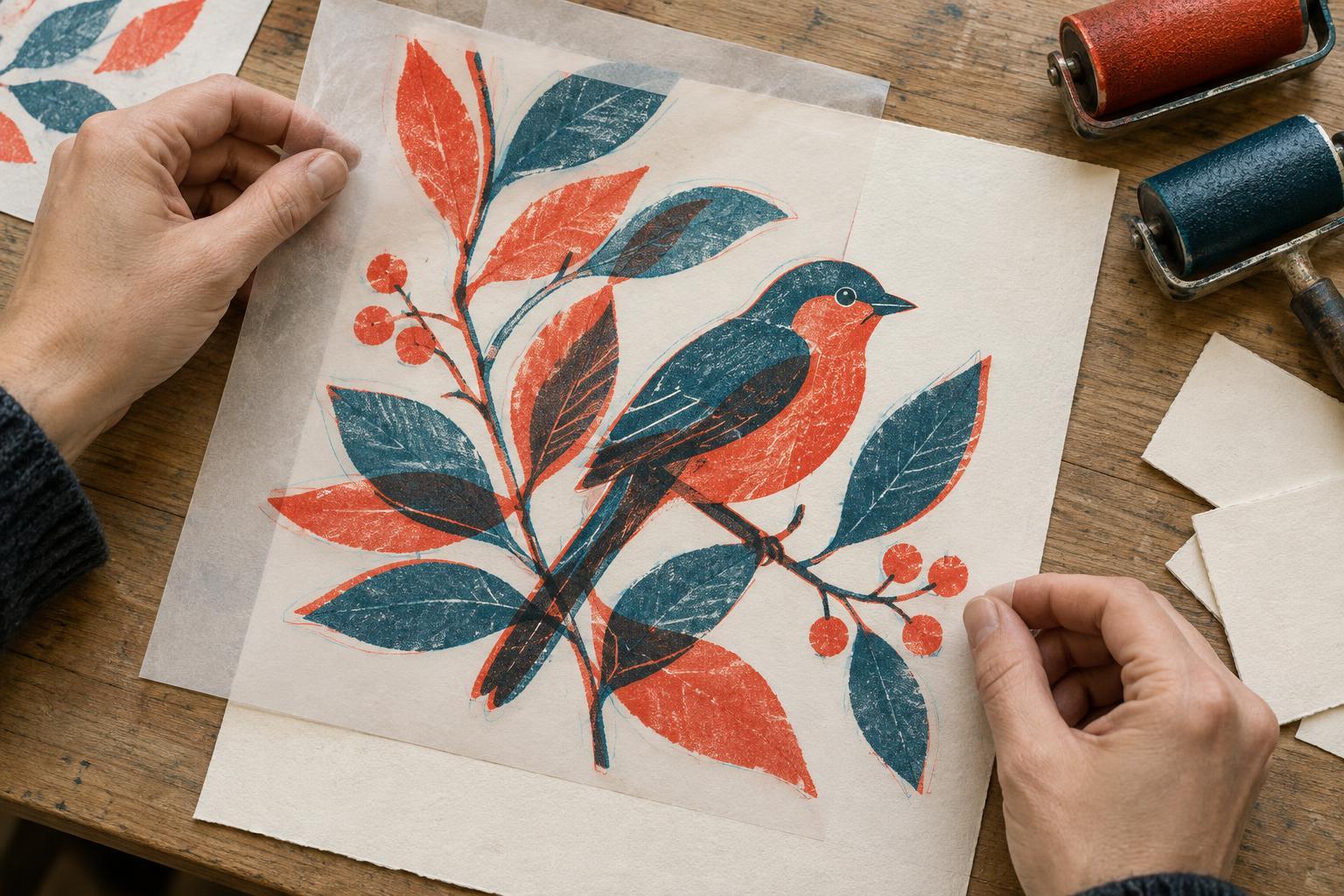
A two-color overprint effect begins with two separate sets of shapes. Where those shapes overlap, they create a third visible color. The result can feel richer than a conventional limited palette because the new color belongs to both layers: it can connect a foreground object to its background, suggest a shadow, or add texture without introducing another ink.
Choose two colors that remain distinct when placed side by side and produce a useful mixture when layered. A warm red and a cool blue, for example, may give you a dark violet overlap. But the exact result depends on the colors and the printing or digital settings you use. Make a small swatch sheet before drawing the full image: show each color alone, both together, and each at any lighter tint you expect to use. Judge the swatches by value as well as hue. If the overlap is nearly as light as the individual colors, it may not do enough work as a shadow or point of emphasis.
Give the overlap a job
Start with a simple sketch and assign each color a role. One might carry figures and lettering while the other carries setting and atmosphere. These roles are a planning aid, not a rule. Let a color cross into the other layer when the overlap helps explain form or direct attention. On a character, it could define the underside of a sleeve; in a street scene, it could deepen the space beneath an awning.
Try marking the intended overlap areas on your sketch before making finished shapes. Ask whether each one improves readability. A dense mixture behind a face might obscure an expression, while the same mixture at the edge of a panel could frame it. Also leave some areas in a single color and some in the color of the paper or background. Those quieter spaces make the layered passages noticeable.
For a practice image, draw a plant in a pot beside a window. Put the plant and pot on one layer and the window light and surrounding shapes on the other. Use overlap to darken selected leaves, the interior of the pot, and one corner of the scene. If every leaf gets the same treatment, remove a few overlaps and see whether the plant becomes easier to read.
Build separate artwork for each color
In a digital illustration, keep each color on its own layer or group from the beginning. Draw with solid shapes first; add texture after the main forms work. To preview an ink-like mixture, you can place the upper color on a Multiply layer over the lower color. This is a useful visual approximation, not a guarantee of how physical inks will print. If the work is intended for production, check the printer’s file and ink specifications before treating the preview as final.
Avoid solving every transition with a soft gradient. Overprint effects are often clearest when the boundaries of the two layers can still be understood. Broad blocks, cutout-like silhouettes, and repeated marks make it apparent how the image was assembled. For lighter areas, you can try sparse dots or short strokes instead of reducing the opacity of a large shape. View the artwork at its intended display size: a fine pattern that looks elegant when enlarged may merge into a muddy patch when reduced.
Use imperfect alignment deliberately
Slight misregistration, where one color sits a little away from the other, can add energy and reveal the underlying shapes. It works best when the main subject is already clear. Duplicate your finished file, then shift one color layer a small amount to compare the aligned and offset versions. Watch the edges of faces, hands, small lettering, and other details that depend on precise placement. An offset that livens up a large shadow may make a tiny eye difficult to interpret.
You can design with alignment in mind rather than applying a shift at the end. Give important shapes enough width to remain recognizable if their edges separate. Let an exposed sliver of one color act as a highlight or a sense of motion, but avoid relying on exact overlap for critical details. If you want clean lettering, consider keeping it in a single color.
Check the image as a whole
Before finishing, look at the illustration in grayscale. You should still be able to find the focal point and follow the major forms without depending on color names. Then inspect the two layers separately. Each should contain coherent shapes rather than stray marks that make sense only in the combined preview.
Finally, make a small proof at the size and on the kind of background where the image will appear. Check whether thin lines survive, whether textured areas remain open, and whether the overlap draws attention where you intended. Revise by removing or enlarging shapes before adding more detail. The strength of a two-color image often comes from deciding exactly where its third, overlapping color is needed—and letting the rest of the composition breathe.